Defining the workflow
One of the most important step that you have to do when planning to use autosubmit for an experiment is the definition of the workflow the experiment will use. In this section you will learn about the workflow definition syntax so you will be able to exploit autosubmit’s full potential
Warning
This section is NOT intended to show how to define your jobs. Please go to tutorial section for a comprehensive list of job options.
Simple workflow
The simplest workflow that can be defined it is a sequence of two jobs, with the second one triggering at the end of the first. To define it, we define the two jobs and then add a DEPENDENCIES attribute on the second job referring to the first one.
It is important to remember when defining workflows that DEPENDENCIES on autosubmit always refer to jobs that should be finished before launching the job that has the DEPENDENCIES attribute.
[One]
FILE = one.sh

[Two]
FILE = two.sh
DEPENDENCIES = One
The resulting workflow can be seen in Figure simple
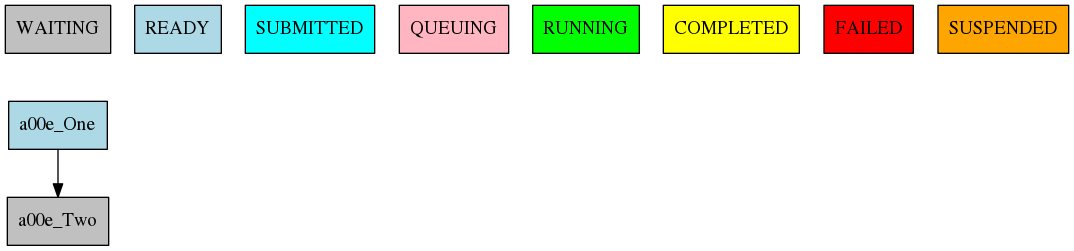
5 Example showing a simple workflow with two sequential jobs
Running jobs once per startdate, member or chunk
Autosubmit is capable of running ensembles made of various startdates and members. It also has the capability to divide member execution on different chunks.
To set at what level a job has to run you have to use the RUNNING attribute. It has four possible values: once, date, member and chunk corresponding to running once, once per startdate, once per member or once per chunk respectively.
[once]
FILE = Once.sh

[date]
FILE = date.sh
DEPENDENCIES = once
RUNNING = date

[member]
FILE = Member.sh
DEPENDENCIES = date
RUNNING = member

[chunk]
FILE = Chunk.sh
DEPENDENCIES = member
RUNNING = chunk
The resulting workflow can be seen in Figure 6 for a experiment with 2 startdates, 2 members and 2 chunks.

6 Example showing how to run jobs once per startdate, member or chunk.
Dependencies
Dependencies on autosubmit were introduced on the first example, but in this section you will learn about some special cases that will be very useful on your workflows.
Dependencies with previous jobs
Autosubmit can manage dependencies between jobs that are part of different chunks, members or startdates. The next example will show how to make a simulation job wait for the previous chunk of the simulation. To do that, we add sim-1 on the DEPENDENCIES attribute. As you can see, you can add as much dependencies as you like separated by spaces
[ini]
FILE = ini.sh
RUNNING = member

[sim]
FILE = sim.sh
DEPENDENCIES = ini sim-1
RUNNING = chunk

[postprocess]
FILE = postprocess.sh
DEPENDENCIES = sim
RUNNING = chunk
The resulting workflow can be seen in Figure 7
Warning
Autosubmit simplifies the dependencies, so the final graph usually does not show all the lines that you may expect to see. In this example you can see that there are no lines between the ini and the sim jobs for chunks 2 to 5 because that dependency is redundant with the one on the previous sim
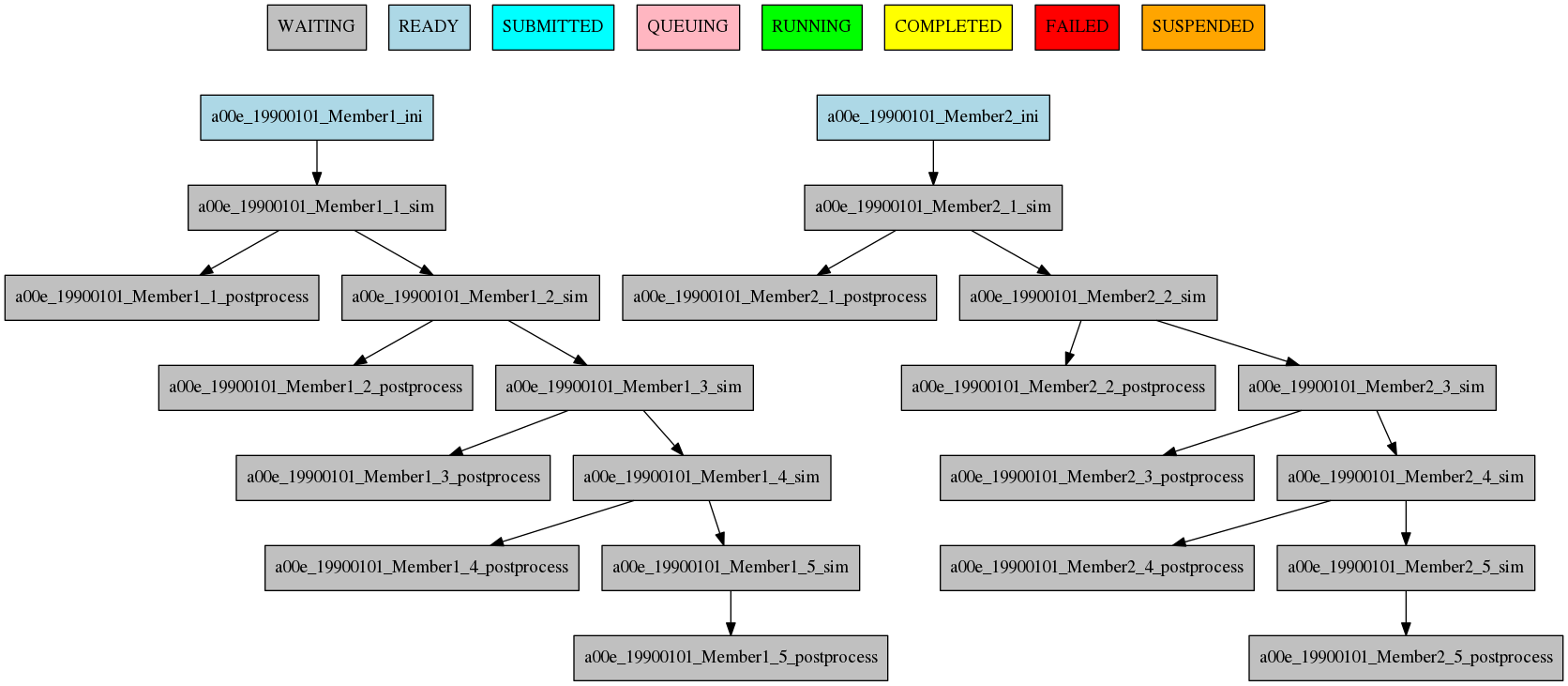
7 Example showing dependencies between sim jobs on different chunks.
Dependencies between running levels
On the previous examples we have seen that when a job depends on a job on a higher level (a running chunk job depending on a member running job) all jobs wait for the higher running level job to be finished. That is the case on the ini sim dependency on the next example.
In the other case, a job depending on a lower running level job, the higher level job will wait for ALL the lower level jobs to be finished. That is the case of the postprocess combine dependency on the next example.
[ini]
FILE = ini.sh
RUNNING = member

[sim]
FILE = sim.sh
DEPENDENCIES = ini sim-1
RUNNING = chunk

[postprocess]
FILE = postprocess.sh
DEPENDENCIES = sim
RUNNING = chunk

[combine]
FILE = combine.sh
DEPENDENCIES = postprocess
RUNNING = member
The resulting workflow can be seen in Figure dependencies
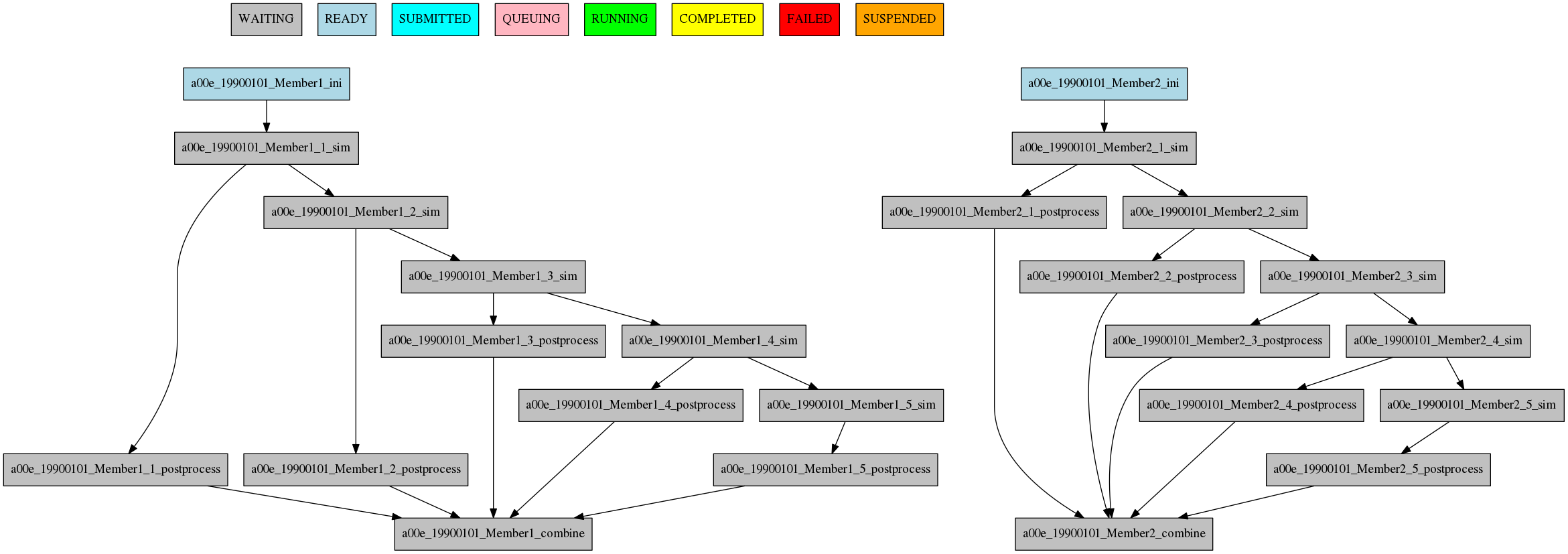
8 Example showing dependencies between jobs running at different levels.
Job frequency
Some times you just don’t need a job to be run on every chunk or member. For example, you may want to launch the postprocessing job after various chunks have completed. This behaviour can be achieved using the FREQUENCY attribute. You can specify an integer I for this attribute and the job will run only once for each I iterations on the running level.
Hint
You don’t need to adjust the frequency to be a divisor of the total jobs. A job will always execute at the last iteration of its running level
[ini]
FILE = ini.sh
RUNNING = member

[sim]
FILE = sim.sh
DEPENDENCIES = ini sim-1
RUNNING = chunk

[postprocess]
FILE = postprocess.sh
DEPENDENCIES = sim
RUNNING = chunk
FREQUENCY = 3

[combine]
FILE = combine.sh
DEPENDENCIES = postprocess
RUNNING = member
The resulting workflow can be seen in Figure 9
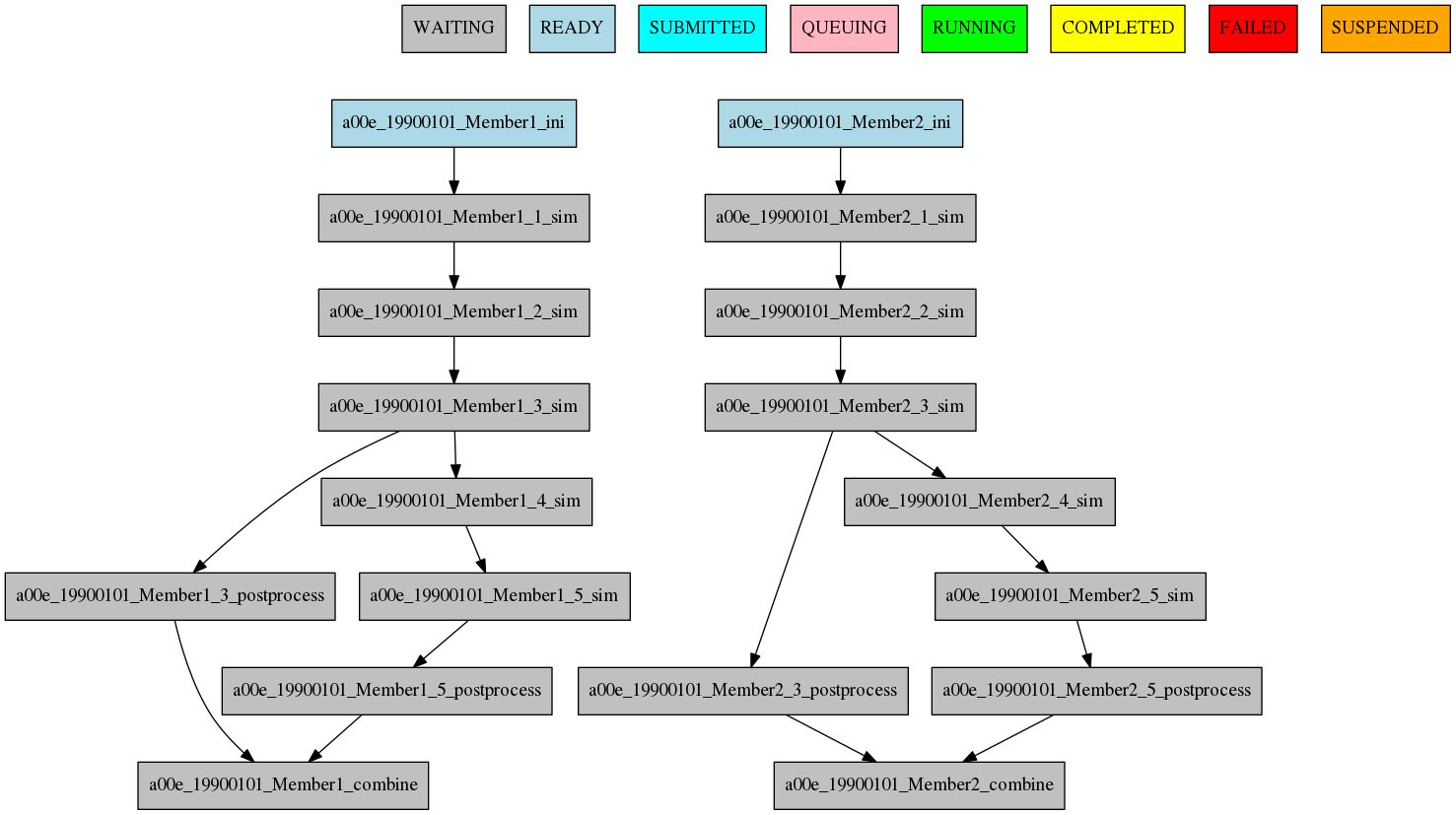
9 Example showing dependencies between jobs running at different frequencies.
Job synchronize
For jobs running at chunk level, and this job has dependencies, you could want not to run a job for each experiment chunk, but to run once for all member/date dependencies, maintaining the chunk granularity. In this cases you can use the SYNCHRONIZE job parameter to determine which kind of synchronization do you want. See the below examples with and without this parameter.
Hint
This job parameter works with jobs with RUNNING parameter equals to ‘chunk’.
[ini]
FILE = ini.sh
RUNNING = member

[sim]
FILE = sim.sh
DEPENDENCIES = INI SIM-1
RUNNING = chunk

[ASIM]
FILE = asim.sh
DEPENDENCIES = SIM
RUNNING = chunk
The resulting workflow can be seen in Figure 10
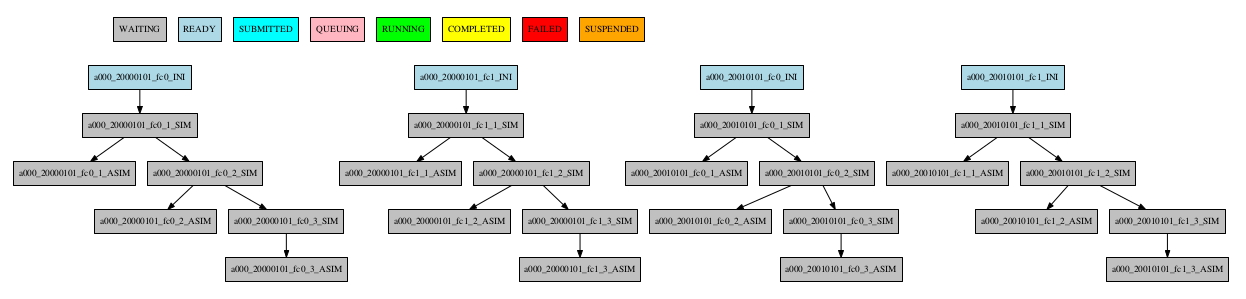
10 Example showing dependencies between chunk jobs running without synchronize.
[ASIM]
SYNCHRONIZE = member
The resulting workflow of setting SYNCHRONIZE parameter to ‘member’ can be seen in Figure 11
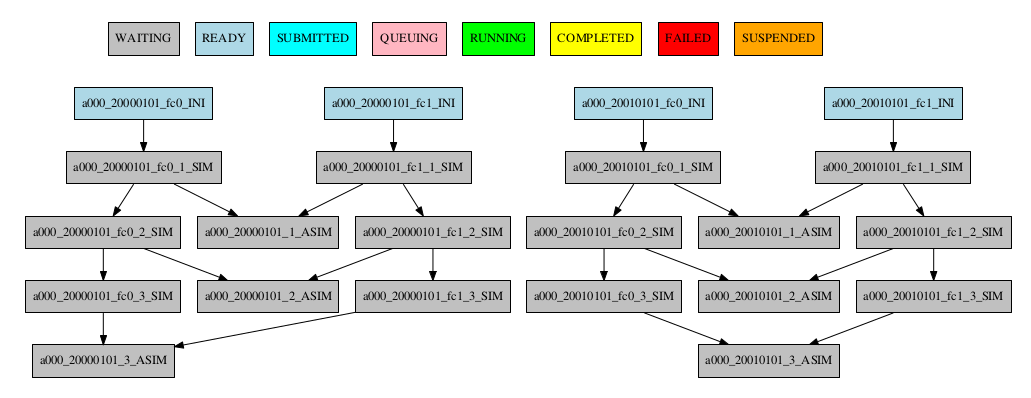
11 Example showing dependencies between chunk jobs running with member synchronize.
[ASIM]
SYNCHRONIZE = date
The resulting workflow of setting SYNCHRONIZE parameter to ‘date’ can be seen in Figure 12
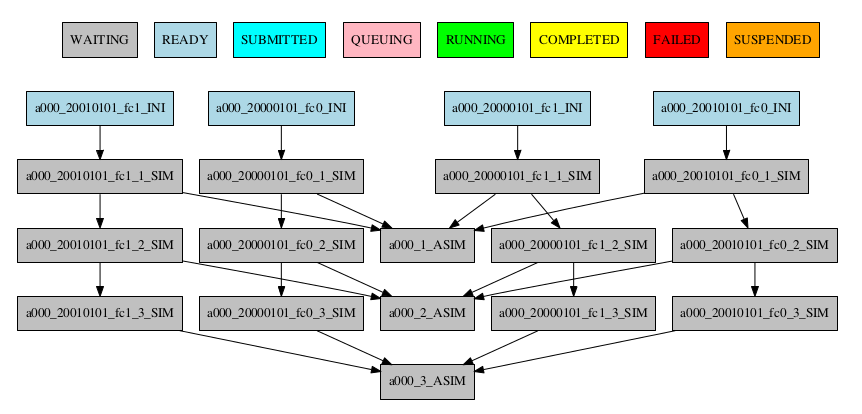
12 Example showing dependencies between chunk jobs running with date synchronize.
Job split
For jobs running at chunk level, it may be useful to split each chunk into different parts. This behaviour can be achieved using the SPLITS attribute to specify the number of parts. It is possible to define dependencies to specific splits within [], as well as to a list/range of splits, in the format [1:3,7,10] or [1,2,3]
Hint
This job parameter works with jobs with RUNNING parameter equals to ‘chunk’.
[ini]
FILE = ini.sh
RUNNING = member

[sim]
FILE = sim.sh
DEPENDENCIES = ini sim-1
RUNNING = chunk

[asim]
FILE = asim.sh
DEPENDENCIES = sim
RUNNING = chunk
SPLITS = 3

[post]
FILE = post.sh
RUNNING = chunk
DEPENDENCIES = asim[1] asim[1]+1
The resulting workflow can be seen in Figure 13
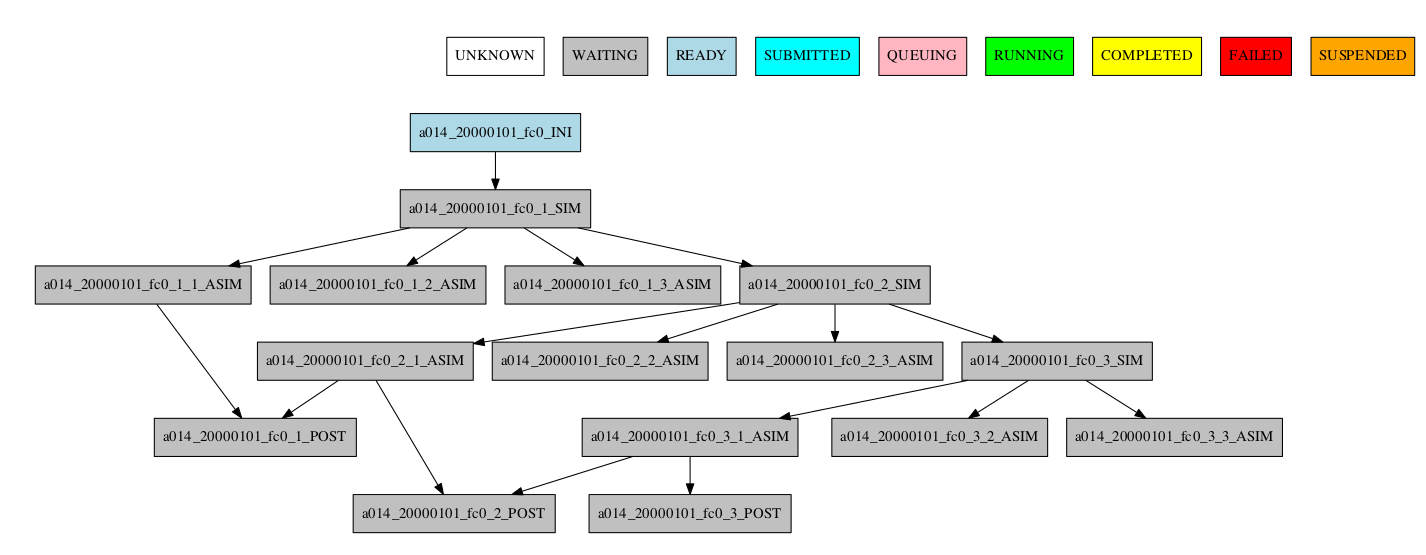
13 Example showing the job ASIM divided into 3 parts for each chunk.
Job delay
Some times you need a job to be run after a certain number of chunks. For example, you may want to launch the asim job after various chunks have completed. This behaviour can be achieved using the DELAY attribute. You can specify an integer N for this attribute and the job will run only after N chunks.
Hint
This job parameter works with jobs with RUNNING parameter equals to ‘chunk’.
[ini]
FILE = ini.sh
RUNNING = member

[sim]
FILE = sim.sh
DEPENDENCIES = ini sim-1
RUNNING = chunk

[asim]
FILE = asim.sh
DEPENDENCIES = sim asim-1
RUNNING = chunk
DELAY = 2

[post]
FILE = post.sh
DEPENDENCIES = sim asim
RUNNING = chunk
The resulting workflow can be seen in Figure 14
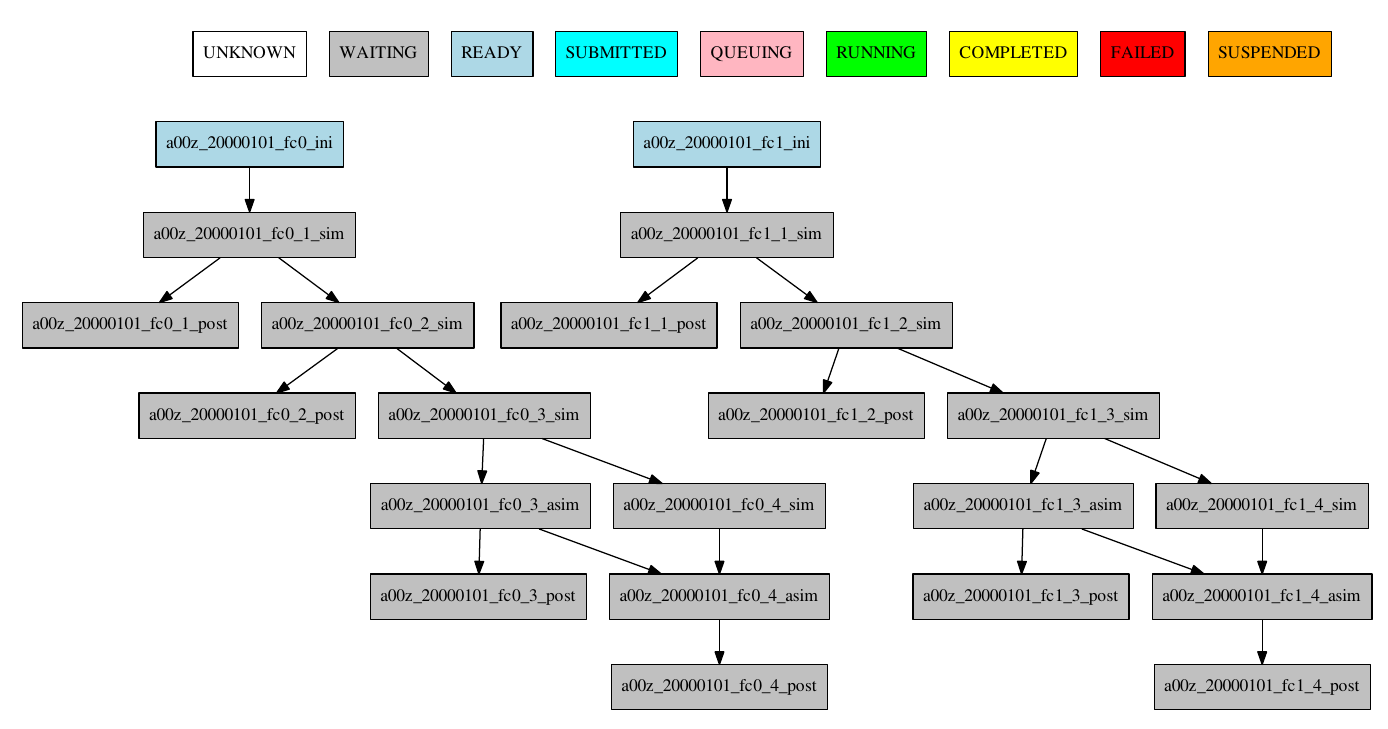
14 Example showing the asim job starting only from chunk 3.
Workflow examples:
Example 1:
In this first example, you can see 3 jobs in which last job (POST) shows an example with select chunks:
[INI]
FILE = templates/common/ini.tmpl.sh
RUNNING = member
WALLCLOCK = 00:30
QUEUE = debug
CHECK = true

[SIM]
FILE = templates/ecearth3/ecearth3.sim
DEPENDENCIES = INI
RUNNING = chunk
WALLCLOCK = 04:00
PROCESSORS = 1616
THREADS = 1

[POST]
FILE = templates/common/post.tmpl.sh
DEPENDENCIES =  SIM
RUNNING = chunk
WALLCLOCK = 01:00
QUEUE = Debug
check = true
# Then you can select the specific chunks of dependency SIM with one of those lines:

SELECT_CHUNKS = SIM*[1]*[3] # Will do the dependency of chunk 1 and chunk 3. While chunks 2,4  won't be linked.
SELECT_CHUNKS = SIM*[1:3] #Enables the dependency of chunk 1,2 and 3. While 4 won't be linked.
SELECT_CHUNKS = SIM*[1,3] #Enables the dependency of chunk 1 and 3. While 2 and 4 won't be linked
SELECT_CHUNKS = SIM*[1] #Enables the dependency of chunk 1. While 2, 3 and 4 won't be linked
Example 2: select_chunks
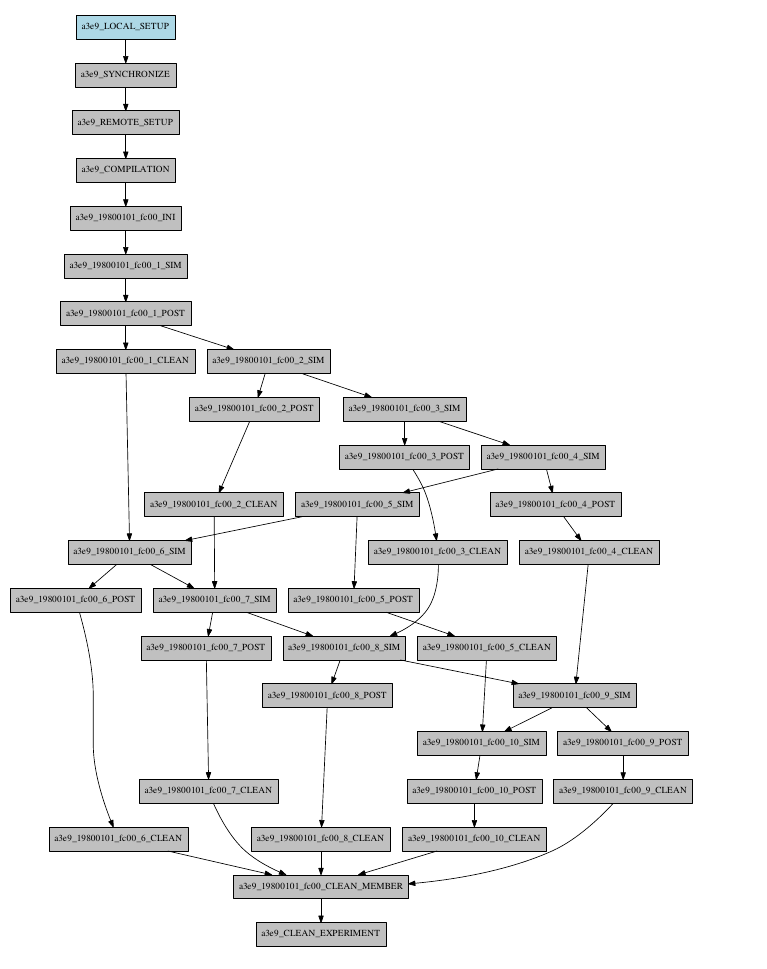
In this workflow you can see an illustrated example of select_chunks used in an actual workflow, to avoid an excess of information we only will see the configuration of a single job:
[SIM]
FILE = templates/sim.tmpl.sh
DEPENDENCIES = INI SIM-1 POST-1 CLEAN-5
SELECT_CHUNKS = POST*[1]
RUNNING = chunk
WALLCLOCK = 0:30
PROCESSORS = 768
Example 3: SKIPPABLE
In this workflow you can see an illustrated example of SKIPPABLE parameter used in an dummy workflow.
[SIM]
FILE = sim.sh
DEPENDENCIES = INI POST-1
WALLCLOCK = 00:15
RUNNING = chunk
QUEUE = debug
SKIPPABLE = TRUE

[POST]
FILE = post.sh
DEPENDENCIES = SIM
WALLCLOCK = 00:05
RUNNING = member
#QUEUE = debug

Example 4: Weak dependencies
In this workflow you can see an illustrated example of weak dependencies.
Weak dependencies, work like this way:
- X job only has one parent. X job parent can have “COMPLETED or FAILED” as status for current job to run.
- X job has more than one parent. One of the X job parent must have “COMPLETED” as status while the rest can be “FAILED or COMPLETED”.
[GET_FILES]
FILE = templates/fail.sh
RUNNING = chunk

[IT]
FILE = templates/work.sh
RUNNING = chunk
QUEUE = debug

[CALC_STATS]
FILE = templates/work.sh
DEPENDENCIES = IT GET_FILES?
RUNNING = chunk
SYNCHRONIZE = member

Example 5: Select Member
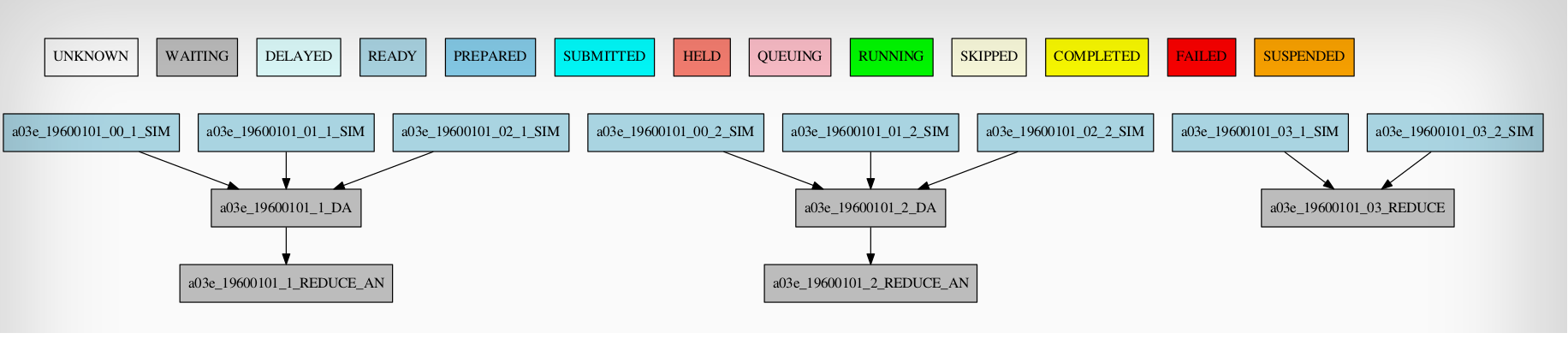
In this workflow you can see an illustrated example of select member. Using 4 members 1 datelist and 4 different job sections.
Expdef:
[experiment]
DATELIST = 19600101
MEMBERS = 00 01 02 03
CHUNKSIZE = 1
NUMCHUNKS = 2
Jobs_conf:
[SIM]
...
RUNNING = chunk
QUEUE = debug

[DA]
...
DEPENDENCIES = SIM
SELECT_MEMBERS = SIM*[0:2]
RUNNING = chunk
SYNCHRONIZE = member

[REDUCE]
...
DEPENDENCIES = SIM
SELECT_MEMBERS = SIM*[3]
RUNNING = member
FREQUENCY = 4

[REDUCE_AN]
...
FILE = templates/05b_sim.sh
DEPENDENCIES = DA
RUNNING = chunk
SYNCHRONIZE = member